Rhino Plugin
Lighting
The Lighting dropdown is the single most important variable for setting the mood, lighting, and emotional tone of your image. This is where you act as the Director of Photography for your scene.
Lighting
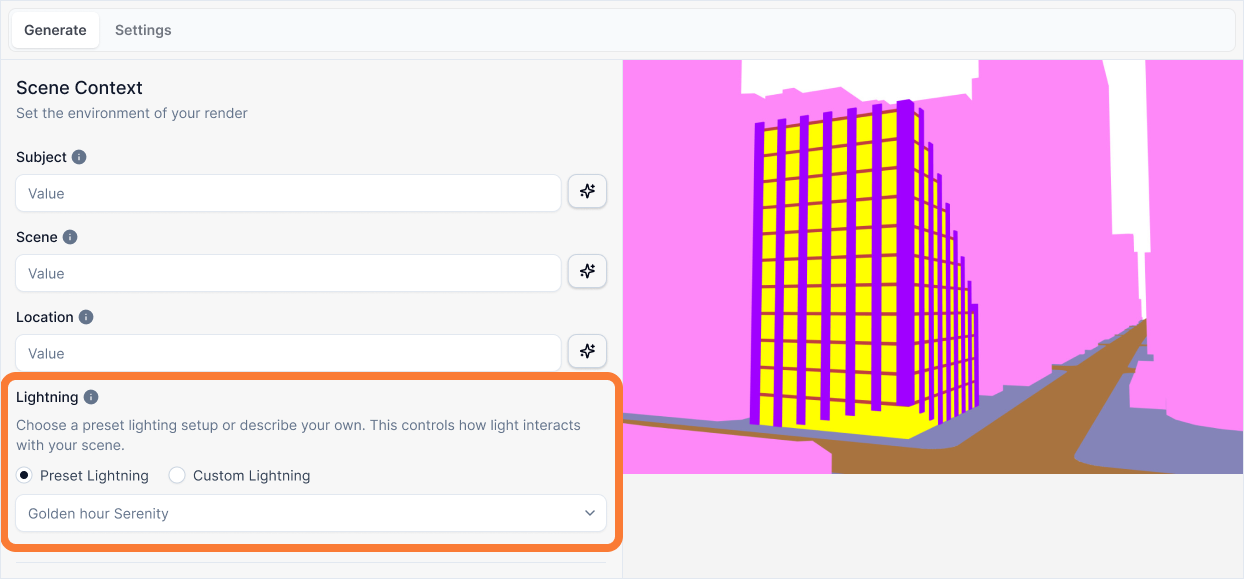
What it is:
A dropdown menu that lets you select from professionally crafted lighting presets. Each preset automatically applies a complete set of lighting, weather, and atmospheric instructions to produce a high-quality, predictable result.
Influence and importance:
Simply choose the preset that best matches the mood and feeling you want to create for your image. Your selection will automatically apply a professionally crafted set of lighting, weather, and atmospheric instructions to produce a high-quality, predictable result. This choice controls the entire feeling of your image—the same building can feel calm and inviting or dramatic and imposing based on this selection alone.
What To Pay Attention To:
Consider Your Shot Type: First, determine whether your view is an Exterior Shot (looking at the building from the outside) or an Interior Shot (looking at a room from the inside) and choose from the appropriate list.
Match the Mood: The lighting preset sets the emotional tone. Choose one that aligns with the feeling you want to convey—serene, dramatic, cozy, or crisp.
Fast and Reliable: Using presets is the fastest and most reliable way to achieve a high-quality, predictable, and beautifully lit result. Each preset is professionally crafted to work together harmoniously.
Don't Mix with Scene: Remember that lighting and weather are controlled here, not in the Scene input. Keep your Scene description focused on physical objects only.
Exterior Shot Presets
Choose from these presets when rendering the exterior of your building:
Golden Hour Serenity
Choose this for beautiful, warm, and inviting shots with long, soft shadows. It's the classic "golden hour" look, perfect for creating a positive and serene mood.
Pending image
Architectural Blue Hour
Choose this for sophisticated, moody shots set just after sunset. It's ideal for cityscapes and for highlighting your building's artificial lighting with a beautiful warm-cool color contrast.
Pending image
Overcast Studio Look
Choose this for clean, neutral, and evenly lit scenes. This preset removes all harsh shadows, revealing the pure form and materials of your building, much like in a professional photo studio.
Pending image
Dramatic Post-Storm
Choose this for high-impact, cinematic scenes. It creates a moody atmosphere with wet surfaces that produce sharp reflections and a dramatic burst of sunlight.
Pending image
Misty Morning / Foggy
Choose this for soft, ethereal, and atmospheric shots. It's especially effective for buildings in natural landscapes, creating a quiet and mysterious mood by wrapping your subject in soft fog.
Pending image
Crisp Winter Day
Choose this for sharp, cool light that conveys a sense of clean, modern precision. This preset creates long, hard-edged shadows and a bright, high-contrast feel.
Pending image
Dramatic Night Illumination
Choose this to showcase your building as a beacon of light against a dark sky. It focuses exclusively on your project's artificial lighting design, creating a sophisticated and high-contrast night scene.
Pending image
Interior Shot Presets
Choose from these presets when rendering interior spaces:
Soft & Diffused Daylight
Choose this for bright, airy, and evenly lit interior shots with no harsh shadows. It's perfect for creating a calm, minimalist, gallery-like feel that showcases materials clearly.
Pending image
Direct Sunlight & Shadow Play
Choose this for dynamic, high-contrast scenes. Hard-edged beams of sunlight will stream through the windows, creating dramatic patterns of light and shadow that bring energy and life to the space.
Pending image
Warm & Cozy Evening
Choose this for intimate and inviting shots set after sunset. The scene will be dominated by warm artificial lights like lamps, creating a cozy and sophisticated atmosphere against the cool twilight visible outside.
Pending image
Minimalist Mixed Lighting
Choose this for clean and contemporary scenes that blend cool, indirect daylight with subtle, neutral-white artificial lights (like LED strips) to highlight specific architectural features.
Pending image
Dramatic Interior Night
Choose this for moody and theatrical shots with extreme contrast. Only a few strategic light sources will illuminate the space, leaving large areas in deep shadow to create a dramatic and high-end feel.
Pending image
Best Practices
When selecting a lighting preset:
Identify your shot type first - Determine if you're rendering an exterior or interior view, then choose from the appropriate preset list.
Match the mood to your purpose - Consider what emotion you want to convey. A serene residential project might use Golden Hour Serenity, while a dramatic commercial building might use Architectural Blue Hour.
Let presets do the work - These presets are professionally crafted to work together. Trust them rather than trying to override with Scene descriptions.
Experiment with different moods - The same building can look completely different with different lighting presets. Try a few to see which best serves your vision.
Consider your materials - Some presets showcase materials better than others. Overcast Studio Look is excellent for revealing material textures, while Golden Hour Serenity adds warmth to natural materials.
Don't duplicate in Scene - Remember that lighting, weather, and atmosphere are controlled here. Keep your Scene input focused on physical objects and activity only.
The lighting preset is one of the most impactful choices you'll make—it transforms not just the look, but the entire feeling of your render.